In praise of Aegis Authenticator (and KDE Connect)
written on Thursday, May 14, 2026
Foldable phones for the win!
Until recently, I had been the happy owner of a Motorola Razr 40. This foldable phone finally solves the very first-world issue of having to carry a giant rectangle that does not properly fit in my front pocket.
Or not
I was a bit too confident with this phone though. The other day while doing some work in the garden I put the phone hinge-down in the front pocket of my overalls.
The pocket that contained sawdust.
When I opened the phone, the hinge made a scary scratchy noise. The middle of the screen showed up black and, much more annoyingly, the screen stopped responding to touch.
Problem: I use this phone for 2FA authentication, both for work and for home.
Aegis Authenticator to the rescue
Luckily for me, I had previously set up my previous phone as a backup 2FA device. This is all thanks to Aegis Authenticator, a free-software 2FA Android app.
What makes this app different from others like Google Authenticator is that it's easy to export its database to another device. And since accessing the tokens requires authentication, either by a passphrase or using fingerprints, it's OK to have them on multiple devices. The export files themselves are encrypted, so it's not scary to pass them around devices.
Even more rescue
I had been using my backup phone for a while, when I had the need to access a service I use for work. I created an account for this service very recently, and the 2FA token for it was not on my backup phone...
This is where luck and free software saved me one more time. I powered up my broken phone and I was able to unlock it thanks to a mouse plugged to its USB port. I then browsed its files using the wonderful KDE Connect. I didn't know what to look for, until I noticed an "Aegis" folder containing a bunch of JSON files:
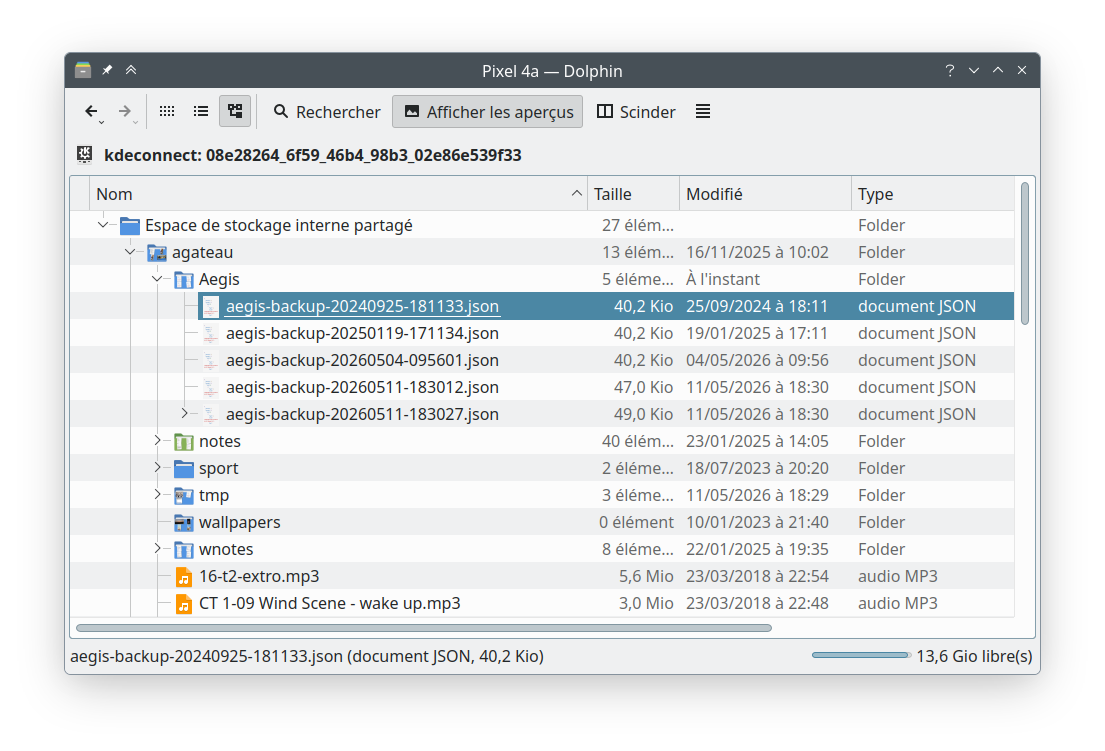
Turns out Aegis Authenticator regularly creates backups of its database!
I copied the latest JSON file to my backup phone (again, using KDE Connect), opened Aegis Authenticator and asked the app to import from this file. At this point I was feeling relieved but was expecting to have to deal with duplicate tokens, but the app went the extra mile: it presented a list of tokens to import from the backup and had helpfully only selected the ones that were not already there! I imported the missing tokens and was able to carry on with my day!
Lessons learned
Breaking your phone is never fun, but at least I got to learn a few things:
- Foldable phones are awesome, but buying a case for them still makes sense...
- Use Aegis Authenticator for your 2FA needs
- Setup a backup device for it
- Setup a regular backup of Aegis's backup folder, for example with Syncthing, another wonderful free software app. Alternatively you can enable cloud backups, since the database is encrypted that would be safe, but I like to have local solutions.